
Basler's camera can now control the lens and the light, over one cable
Basler has launched Lens and Lighting Control. The camera drives a motorized or liquid lens and a matched light through a Sync Cable and one I/O line, with no external controller. What is in it, what it costs on Basler's list, and what to check first.
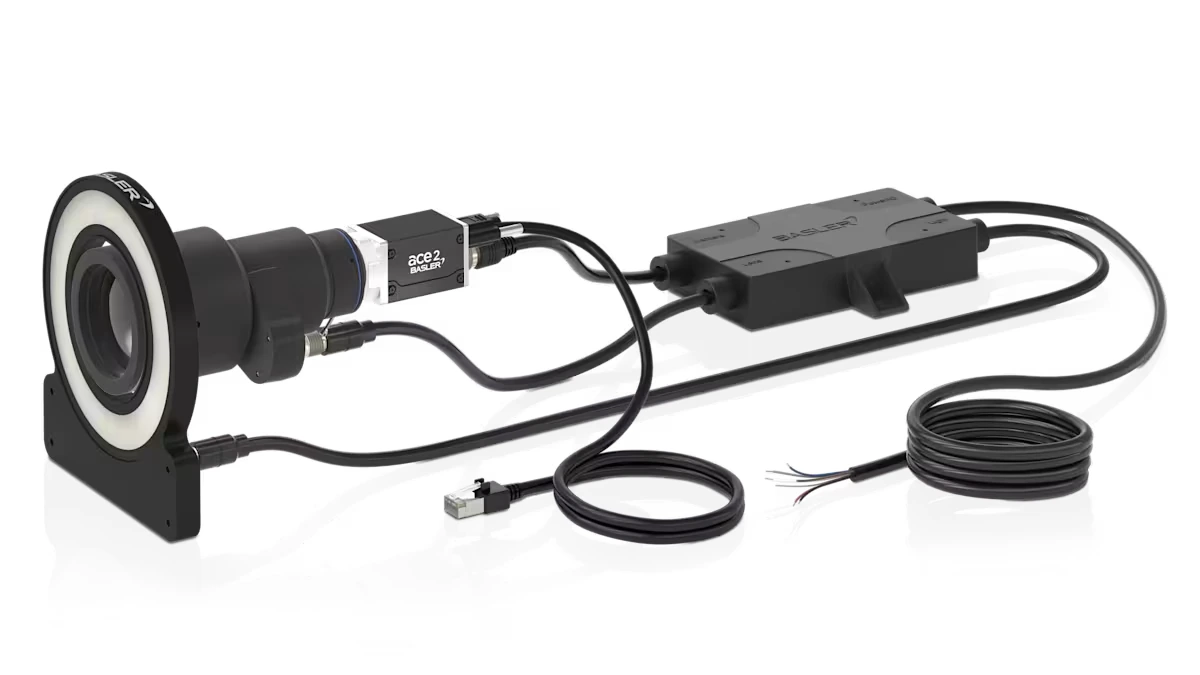
Smart cameras are very comfortable to set up: the light and the autofocus are done in a few seconds. Building a more advanced, custom application on a separate camera, lens and light has not usually felt like that. The idea behind Basler's new Lens and Lighting Control is that it can: the same quick set-up of light and focus, in an application we build ourselves.
It works by letting the camera run its own lens and its own light. A Sync Cable joins the three, the camera sends the commands, and the programmer uses the same GenICam SDK that already controls the camera.
The case Basler makes on its product page is that in a real vision project the hard part is seldom taking the picture. It is getting the camera, the lens and the light to work together, in step. The traditional route, as Basler lists it, means external controllers, complex wiring, preconfigured systems, several SDKs, control that isn't GenICam, and I/O lines used up. Its answer is to drive the lens and the light from the camera itself, through one cable.
What it comes down to
- One cable. The Sync Cable joins the camera, the lens and the light. It powers the lens and the light and carries the commands to them.
- One camera I/O line. The cable uses a single line on the camera, in both directions, so a second GPIO line and an opto input stay free for other jobs.
- One SDK. The lens and light functions are GenICam-compliant, so settings such as autofocus and strobe mode come through the same SDK as the camera's own, in pylon or in any other GenICam-compliant one. Basler says the commands go from the camera to the lens and the light with precise timing.
- Pick what you need. What the camera controls depends on the cable: lens and light, lens only, or light only.
Three ways to use it
The cable you choose decides what the camera controls. Basler's page gives example uses for each of the three.
- Logistics, with autofocus and strobing
- Electronics inspection where the part height varies
- Moving robot arms, with a flash accurate to the microsecond
- Robots with a fixed light
- Medical devices with their own LED
- Compact systems
- Box heights in packaging, sample holders and Z heights
- Bin picking and pick and place
- Test stations with a fixed spacing
- High-throughput conveyors
- Fixed optics with complex lighting
- Strobing and overdrive for fault detection, and consistent illumination
- Freezing motion, for example to read licence plates
The Sync Cable
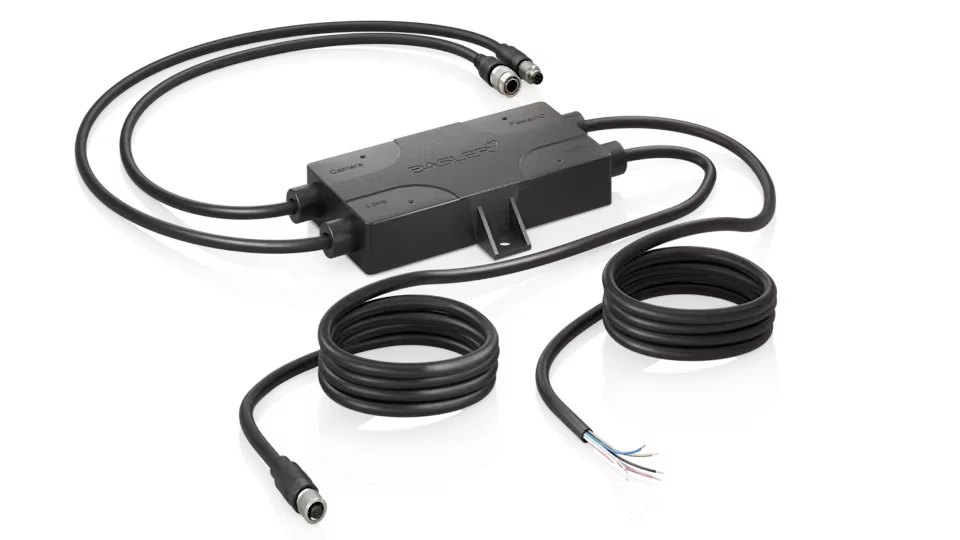
The cable is where the work happens. Basler's page for the 3 m lens-and-lighting version calls it an "intelligent power I/O cable": an X shape with a control unit in the middle (8.5 × 5.4 cm, with two mounting holes) and four legs.
- To the camera: M8, 6-pin, 50 cm
- To the lens: Hirose, 6-pin, 50 cm
- To the light: M8, 4-pin, 50 cm
- To the host: an open end, 2.5 m
It powers the lens and the light, and optionally the camera too. The commands pass over one bidirectional camera I/O line, and the page says no separate software is needed.
Basler lists 13 Sync Cables: lens and lighting, lighting only, and lens only. The first two come in 3, 4 and 5 m, with an M8 4-pin or an M12 5-pin connector on the light end. The lens-only cable comes in one length, 3 m. Prices are in the cost section below.
The lens: motorized or liquid
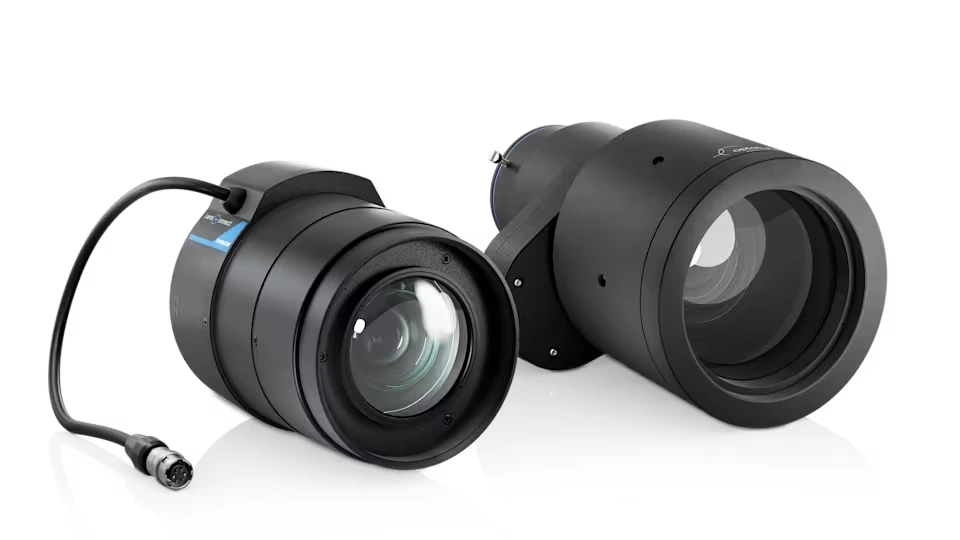
Basler offers two kinds of lens for the system, and the camera powers both through the cable: motorized lenses from Computar, and liquid lenses from Optotune, which focus electronically by changing the curvature of a liquid lens, with no mechanical parts.
The comparison below combines Basler's page for the system with its shop pages for one example of each: the Computar DL1224SC-MPY-B and the Optotune ELM-12-4.0-18-C-E.
- What the camera controls
- Focus, zoom and aperture, depending on the model
- Focal length
- Fixed, from 8 to 75 mm, or a variable range
- Sensor size
- Up to 1.1", up to 20 MP
- In Basler's configurator
- 26 lenses
- An example
- DL1224SC-MPY-B: 12 mm, F1.4 to F16, 12 MP (2.75 µm), minimum working distance 100 mm, C-mount
- Warranty on that example
- 12 months
- What the camera controls
- Focus, electronically, with no mechanical parts
- Focal length
- Fixed, from 12 to 50 mm, at F3.1 to F5.4
- Sensor size
- Up to 1.1"
- In Basler's configurator
- 8 lenses
- An example
- ELM-12-4.0-18-C-E: 12 mm, F4, 12 MP (2.7 µm), minimum working distance 200 mm, C-mount
- Warranty on that example
- 36 months
| Computar motorized | Optotune liquid | |
|---|---|---|
| What the camera controls | Focus, zoom and aperture, depending on the model | Focus, electronically, with no mechanical parts |
| Focal length | Fixed, from 8 to 75 mm, or a variable range | Fixed, from 12 to 50 mm, at F3.1 to F5.4 |
| Sensor size | Up to 1.1", up to 20 MP | Up to 1.1" |
| In Basler's configurator | 26 lenses | 8 lenses |
| An example | DL1224SC-MPY-B: 12 mm, F1.4 to F16, 12 MP (2.75 µm), minimum working distance 100 mm, C-mount | ELM-12-4.0-18-C-E: 12 mm, F4, 12 MP (2.7 µm), minimum working distance 200 mm, C-mount |
| Warranty on that example | 12 months | 36 months |
The light
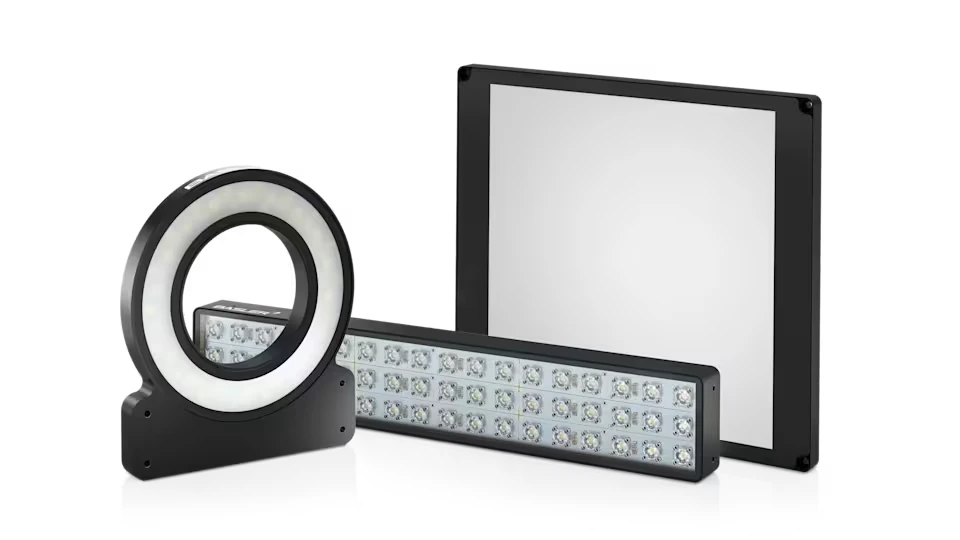
The lights come as rings, bars and back lights, in several sizes and in white, blue, red, IR, UV and SWIR. Basler's configurator lists 330 of them, and the page says they all have "Light Control Inside".
The page for one example, the Light Ring-120OD-IP67_Power-W, shows what that means. It is a white ring (5000 K) in IP67, on 24 V DC (±5 %) and listed at 16 W and 900 mA, with pulses from 100 µs up to continuous. It measures 130 × 141 × 12 mm, weighs 350 g and is rated for 10 to 30 °C.
The ring can run on its own, steady or triggered, or with an external current controller. With the Sync Cable the camera drives it instead, with synchronised flash, brightness and overdrive. The camera detects the light model by itself and does the first configuration.
The camera and the software
Basler names two camera families for the system. The ace 2 comes with GigE, 5GigE, 10GigE, CoaXPress, USB 3.0 or GMSL2 interfaces, up to 240 fps and 25 MP, with global or rolling shutter CMOS sensors, from UV to SWIR. The boost R is CoaXPress, up to 400 fps and 16.1 MP, with a Sony global shutter sensor. Basler's configurator for the system lists 219 cameras.
Every control function is GenICam-compliant, so it works from pylon or from any GenICam-compliant SDK. Basler's Technical Architect says that because the functions sit in standard GenICam registers, parts from different makers can be driven through the same API.
The light side in the SDK
Basler's Light Control docs (read on 3 November 2026) describe the light side. The feature controls up to four lights, and on the ace 2 and boost R the camera always uses Line 3 for it. In outline:
- Set
BslLightControlModeto On. - Run the
BslLightControlEnumerateDevicescommand. The camera finds the lights on its I/O line and gives each one an ID. - With several lights, choose one with
BslLightDeviceSelectorand check thatBslLightDeviceLastErrorreads NoError. - Set
BslLightDeviceBrightness. 100 is 100 % of the light's nominal current. A higher value is overdriving, which is for strobe mode. - Set
BslLightDeviceOperationModeto On for a steady light, or to Strobe for a flash. - For a strobe, name the trigger with
BslLightControlTriggerSource(FlashWindow, for example). WithBslLightDeviceStrobeModeon Automatic the strobe follows the camera's flash window. On Manual the length comes fromBslLightDeviceStrobeDuration, in microseconds.
A Basler Camera Light has its controller built in. The docs say that a Basler Light or another maker's LED lighting needs the Basler SLP Strobe Controller.
The fine print in those docs
- Switching
BslLightControlModeon turns Serial Communication off, because Light Control uses the serial link itself. - The light can take up to a second to come on after that, so the first image may be dark. Discard it, or start acquiring after a delay.
- On the ace 2 and boost R, light settings loaded from a user set apply only after the enumerate command has run.
- Automatic strobe mode doesn't go with the Trigger Width exposure mode or Exposure Auto, and it isn't available with the Sequencer.
- Every light needs its own ID (1 to 4, or 7 as shipped). Two lights with the same ID cause communication errors, so connect new lights one at a time.
- At the top of the camera's frame rate a trigger can reach a light that is still switching off and be ignored, which gives a dark image. The camera counts these in
BslLightControlOvertriggerCount. - A Basler Camera Light is dimmed by PWM. With exposures under 500 µs and a brightness other than 100 %, rolling shutter cameras can show stripes. When overdriving one, keep the camera at 60 fps or less.
The lens side is not in the docs yet
On 3 November 2026 the camera feature list in Basler's docs had no lens-control topic, and the Light Control topic says nothing about the Sync Cable or lenses, so the lens parameters are not documented there yet.
What it costs
Basler's shop shows euro prices marked "net list price". These were read on 3 November 2026 and can change. The lens and light rows are examples from the list, not a full price list.
| Part | List price |
|---|---|
Sync Cable, lens and lighting 3, 4 or 5 m, with an M8 4-pin or M12 5-pin light connector (six versions) | €199 each |
Sync Cable, lighting only 3, 4 or 5 m, with an M8 4-pin or M12 5-pin light connector (six versions) | €59 for 3 m €69 for 4 m €79 for 5 m |
Sync Cable, lens only 3 m | €199 |
Computar motorized lens DL5028SC-MPY-B, 50 mm | €839 |
Computar motorized lens VL7531S-MPZ-B, 75 mm | €1,129 |
Computar motorized lens VL6Z1626SC-MPYIR-B, 16 to 96 mm zoom | €1,169 |
Optotune liquid lens The eight ELM lenses, 12 to 50 mm | €1,165 to €1,409 |
Light Light Bar-10x100-IP67-IR | €309 |
Light Light Bar-10x165-IP67-IR | €359 |
Light Light Ring-120OD-IP67_Power-W | €679 |
The motorized lenses on the first page of Basler's list, twelve of the 26, run from €839 to €1,169. The cable is the smallest item here, and the pages read show list prices only, with no lead times.
Questions Basler answers
- Do I need a new camera?
- Not if it is an ace 2. According to Basler, an ace 2 you already own needs a firmware update for lens control, plus a Computar motorized or Optotune liquid lens and a Sync Cable.
- What if the light is a long way from the camera?
- The Sync Cable comes in several lengths, so it can reach a light that sits farther away. The list runs from 3 to 5 m.
- Is it for pylon only?
- No. Any GenICam-compliant SDK works.
- Does it work for SWIR?
- Yes. Basler's list for it is an ace 2 X visSWIR camera, a Computar motorized VSW lens, a Basler SWIR light, a Sync Cable for SWIR lights and an SDK.
- How many I/O lines does it use?
- One camera I/O line, used in both directions. A second GPIO line and an opto input stay free.
What to check first
The page and the shop pages leave a few things open, so before designing around it:
- The supply. The cable's page gives no supply voltage or current, and the example ring light is listed at 24 V DC and 900 mA. Work out what the cable, the lens and the light draw together before sizing the supply.
- Versions. An ace 2 needs a firmware update for lens control. Check that the pylon version you use, or another GenICam SDK, shows the lens parameters, because the docs read for this article don't describe them yet.
- Which light, which controller. A Basler Camera Light has the controller built in, and a Basler Light or another maker's LED lighting needs the SLP Strobe Controller. Check which one yours is.
- Cable length and connectors. The list read stops at 5 m, the lens-only cable is 3 m, and the light end is M8 4-pin or M12 5-pin. Check the distances and the light's connector before ordering.
- Overdriving. It can damage a light. The docs say to check the light maker's limit and to leave time between pulses.
- Mixed makers. That parts from different makers can share one API is Basler's claim, and for now the lenses come from two makers, Computar and Optotune. Try it with the parts you plan to use.

Comments
No comments yet. Be the first!